
HTTP-välimuistin selitys: Cache-Control, ETag, kuvat ja Apache-asetukset

Opi, miten määrittää selaimen välimuisti HTML:lle, CSS:lle, JavaScriptille, kuville ja fontteille. Ymmärrä ETag ja 304 -vastaukset käytännön esimerkkien avulla, estä vanhentuneet tiedostot ja käytä täydellistä Apache .htaccess -konfiguraatiota.
HTTP Caching Explained: Cache-Control, ETag, Kuvat ja Apache-asetukset
You optimize your images, minify your CSS, and compress your JavaScript. Your website loads faster. But when visitors return, their browsers may download the same files again.
You enable caching. Everything looks better — until you replace an image and discover that some visitors still see the old one.
This is the challenge of HTTP caching: reuse files that have not changed, but retrieve new versions when they do.
In this guide, we'll build a caching strategy for a real website using Apache, PHP, and browser developer tools.
1. HTTP caching explained with a simple example
Imagine a website with five files:
index.html
assets/css/style.css
assets/js/app.js
assets/images/hero.webp
assets/fonts/site.woff2
When someone visits your website for the first time, the browser downloads these files.
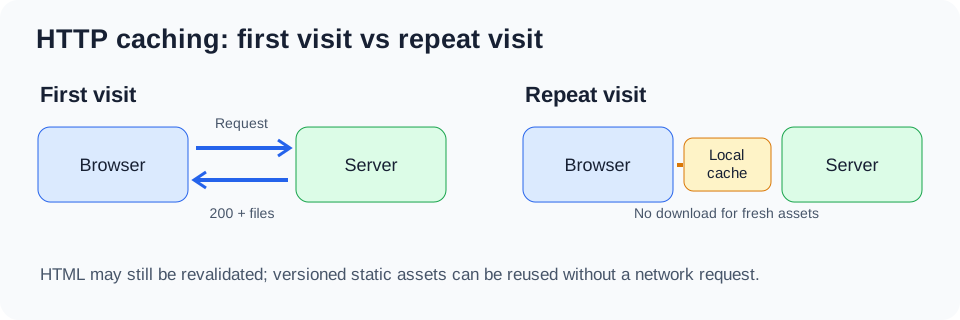
Now imagine that the visitor comes back ten minutes later.
If the server previously told the browser that the CSS file could be reused for one day, the browser does not need to download it again.
The browser already has a copy.
That's the basic idea of caching.
The instructions come from HTTP headers sent with the server's response.
For example:
Cache-Control: public, max-age=86400This means the response may be reused while it is fresh for 86,400 seconds — one day.
But what happens if you update the CSS after only one hour?
The browser may continue using the old version for the remaining 23 hours.
This is why simply increasing cache durations is not enough.
2. Cache-Control: the instructions sent to the browser
The Cache-Control header tells browsers and other HTTP caches how to handle a response.
Here are the directives you'll use most often.
| Directive | Simple explanation |
|---|---|
max-age=3600 |
Reuse the response for up to one hour |
public |
Shared caches, including CDNs, may store the response |
private |
Store only in a private cache, not a shared cache |
no-cache |
Store if permitted, but validate before reuse |
no-store |
Do not store the response |
immutable |
The resource is not expected to change while fresh |
must-revalidate |
Once stale, do not reuse without successful validation |
One particularly confusing directive is no-cache.
It does not mean "never store this file."
It means "before using a stored copy, ask the server whether it is still valid."
For responses that must not be stored, use no-store.
That distinction matters when configuring HTML pages and sensitive content.
3. ETag explained: how the browser asks whether a file has changed
Let's make this concrete.
Imagine you have a file called logo.webp.
The browser downloads it on Monday.
The server also sends an identifier:
ETag: "logo-version-1"Think of this identifier as a label attached to that particular version of the image.
The browser keeps the image and remembers the label.
On Tuesday, the cached response needs validation. Instead of immediately downloading the entire image again, the browser asks:
"Hello server, I already have the image identified by logo-version-1. Is it still the same?"
Technically, it sends:
GET /images/logo.webp HTTP/1.1
Host: example.com
If-None-Match: "logo-version-1"
The server compares that identifier with the current version.
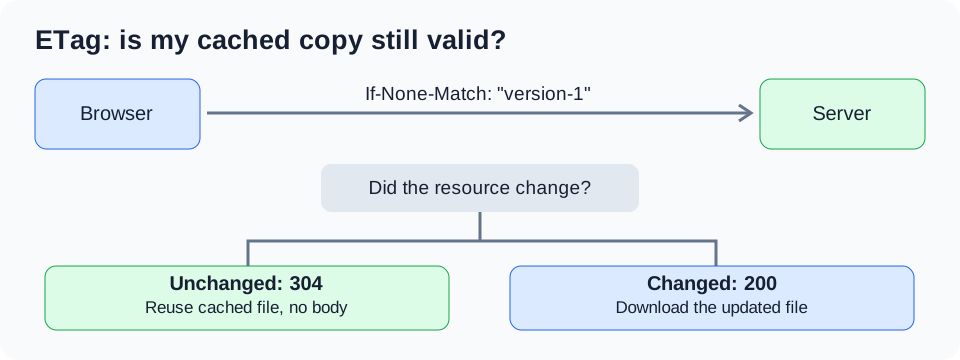
Case A: the image has not changed
The server replies:
HTTP/1.1 304 Not Modified
ETag: "logo-version-1"
The browser says, effectively, "Great, I'll keep using my existing image."
The server does not send the image body again.
Case B: the image has changed
Suppose you replace the logo with a new version.
The server now identifies it as logo-version-2.
The browser still asks about logo-version-1, but the server replies:
HTTP/1.1 200 OK
Content-Type: image/webp
ETag: "logo-version-2"
This time, the response includes the new image.
The browser replaces its cached copy.
That's all ETag does for caching: it helps the browser check whether its copy is still current.
The identifier does not have to be a hash or a version number. Apache may generate it from file metadata, and applications can generate their own identifiers.
Test ETag yourself
First, retrieve the response headers:
curl -I https://example.com/images/logo.webpFind the ETag:
ETag: "abc123"Then send a conditional request:
curl -I \
  -H 'If-None-Match: "abc123"' \
  https://example.com/images/logo.webp
If the representation is unchanged, a correctly configured server can return 304 Not Modified.
If it changed, expect 200 OK with the updated representation.
One important limitation: ETag does not force the browser to contact the server while a cached response is still fresh. If an image has a one-year freshness lifetime, changing the file on the server does not guarantee that the browser will check its ETag immediately.
That's where resource versioning becomes essential.
4. Image caching: the part that often causes the most problems
Images are frequently among the largest resources on a website.
A homepage might contain a hero image, category illustrations, article thumbnails, logos, icons, and product images.
Even when compressed into WebP or AVIF, downloading them repeatedly wastes bandwidth.
Let's examine three real situations.
Situation A: an image that never changes
Your website has a decorative image:
/images/background-v1.webpYou know that whenever the design changes, you will use a new filename.
You can safely configure:
Cache-Control: public, max-age=31536000, immutableThe browser may reuse it for one year without contacting the server while the response is fresh.
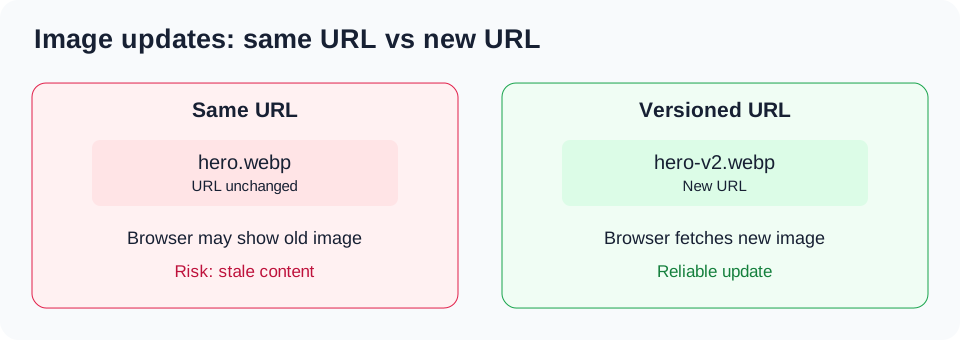
Situation B: an image replaced under the same filename
Your article contains:
<img src="/images/article-hero.webp" alt="Article illustration">You replace article-hero.webp with a new image, but keep the same URL.
If the browser has a fresh cached response with a long lifetime, it may continue displaying the old image.
The fix is to change the URL when the content changes.
For example:
<img src="/images/article-hero.webp?v=2" alt="Article illustration">Or, better, generate a versioned filename:
<img src="/images/article-hero-a81c.webp" alt="Article illustration">Now the browser sees a different resource URL and requests the new image.
The old cached image is harmless because the HTML no longer references it.
Situation C: thousands of images with stable filenames
Imagine an editorial website containing thousands of articles.
Renaming every image manually would be inconvenient.
You can instead choose a moderate cache lifetime, such as one day or one week, and rely on revalidation after expiration.
For example:
Cache-Control: public, max-age=86400That is a reasonable compromise when automatic image versioning is unavailable.
However, visitors can still see an older image during the freshness period.
For images that must update immediately, a changed URL or explicit cache invalidation is preferable.
What about JPEG, PNG, SVG, WebP and AVIF?
The caching principle is identical for all of them.
| Image format | Typical use | Caching strategy |
|---|---|---|
| JPEG | Photos | Long cache if URL is versioned |
| PNG | Graphics, transparency | Same |
| WebP | Optimized web images | Same |
| AVIF | Highly compressed images | Same |
| SVG | Icons, logos, illustrations | Same |
| GIF | Simple animations | Same |
The format affects compression and decoding, but it does not fundamentally change HTTP cache behavior.
Also remember that responsive images may produce several independent cache entries:
<picture>
  <source
    type="image/avif"
    srcset="/images/hero-640.avif 640w,
            /images/hero-1280.avif 1280w">
  <source
    type="image/webp"
    srcset="/images/hero-640.webp 640w,
            /images/hero-1280.webp 1280w">
  <img
    src="/images/hero-1280.jpg"
    alt="Mountain landscape"
    width="1280"
    height="720">
</picture>
Each selected URL has its own caching behavior.
If you replace the image, update the URLs of every relevant variant.
5. Automatically version CSS, JavaScript and images with PHP
For PHP websites, you can avoid manually updating version numbers by using the file modification time.
Here's a small helper:
<?php

function assetUrl(string $path): string
{
    $file = $_SERVER['DOCUMENT_ROOT'] . $path;

    if(!is_file($file)) {
        return $path;
    }

    return $path . '?v=' . filemtime($file);
}
Use it like this:
<link rel="stylesheet" href="<?= htmlspecialchars(assetUrl('/assets/css/site.css'), ENT_QUOTES, 'UTF-8') ?>">

<img
    src="<?= htmlspecialchars(assetUrl('/assets/images/hero.webp'), ENT_QUOTES, 'UTF-8') ?>"
    alt="Hero image">
Suppose the file's modification timestamp is 1794800000.
The browser receives a URL such as:
/assets/images/hero.webp?v=1794800000When you update the file and its modification time changes, the URL changes too.
This is a simple cache-busting strategy.
For production build pipelines, content hashes are more robust because timestamps can be preserved during deployments or change without the content changing.
Important: If your CDN is configured to ignore query strings in its cache key, ?v= may not produce a distinct cached resource. Verify the CDN configuration or use versioned filenames instead.
6. Don't confuse browser cache, server cache and CDN cache
A website can have several caching layers.
The browser cache stores responses on the visitor's device.
A CDN stores selected responses on servers geographically closer to visitors.
An application cache can store generated HTML, database query results, or other computed data.
These layers solve different problems.
For example, a CDN may serve an outdated image even after the browser cache is cleared.
Likewise, clearing a CMS cache does not necessarily invalidate an image already stored by a browser or CDN.
When debugging, identify which layer is serving the old content before changing configuration.
7. Hosting performance and HTTP caching
HTTP caching can significantly reduce repeated downloads, but it cannot compensate for every hosting problem.
For example, if an uncached PHP page takes two seconds to generate because of slow database queries, browser caching of images will not solve the underlying server response time.
A reliable hosting environment should provide suitable PHP performance, storage, compression, TLS, and support for caching headers.
For small and medium websites, a hosting provider such as PlanetHoster can be part of a practical setup.
For applications requiring more control over server resources, deployment workflows, or caching architecture, Cloudways may also be worth evaluating.
Before changing providers, measure the actual bottleneck: server response time, image weight, PHP execution, database queries, or cache configuration.
8. How to inspect caching in Firefox and Chrome
Open your browser developer tools.
In Firefox, press F12, then select Network.
Reload your website and click an image or stylesheet request.
Look at its response headers.
For example:
Cache-Control: public, max-age=86400
ETag: "abc123"
Last-Modified: Mon, 16 Nov 2026 09:00:00 GMT
Now repeat the navigation without disabling the cache.
Depending on the browser, the resource's freshness, and how the navigation was initiated, it may be loaded from local cache, revalidated with a 304, or downloaded again.
To test a specific image independently:
curl -sS -D - -o /dev/null \
  https://example.com/assets/images/hero.webp
Check the status, Cache-Control, ETag, and Last-Modified.
Then repeat the request with If-None-Match using the actual ETag returned by your server.
Avoid using a forced reload as your only cache test: it may deliberately bypass or revalidate cached responses.
9. Complete Apache .htaccess example for a real website
Let's finish with a practical configuration.
This example is designed for a public website running Apache 2.4, with a mixture of static files and PHP-generated HTML.
The strategy is deliberately conservative:
- HTML is revalidated.
- CSS and JavaScript use a seven-day cache.
- Images use a seven-day cache.
- Fonts use a longer cache.
- Manifest files use a short cache.
- ETag remains available for static-file validation.
- PHP responses can set their own policies.
This is a starting configuration, not a universal drop-in replacement. Check the hosting provider's existing rules, enabled modules, and Apache override permissions before deploying it.
# ============================================================
# HTTP CACHING — APACHE 2.4
# Example configuration for a public website
# ============================================================

# ------------------------------------------------------------
# 1. Static file expiration
# ------------------------------------------------------------

<IfModule mod_expires.c>
    ExpiresActive On

    # Default: validate immediately
    ExpiresDefault "access plus 0 seconds"

    # HTML: validate before reuse
    ExpiresByType text/html "access plus 0 seconds"

    # CSS and JavaScript: 7 days
    ExpiresByType text/css "access plus 7 days"
    ExpiresByType text/javascript "access plus 7 days"
    ExpiresByType application/javascript "access plus 7 days"

    # Images: 7 days
    ExpiresByType image/jpeg "access plus 7 days"
    ExpiresByType image/png "access plus 7 days"
    ExpiresByType image/gif "access plus 7 days"
    ExpiresByType image/webp "access plus 7 days"
    ExpiresByType image/avif "access plus 7 days"
    ExpiresByType image/svg+xml "access plus 7 days"
    ExpiresByType image/x-icon "access plus 7 days"
    ExpiresByType image/vnd.microsoft.icon "access plus 7 days"

    # Fonts: 30 days
    ExpiresByType font/woff "access plus 30 days"
    ExpiresByType font/woff2 "access plus 30 days"
    ExpiresByType font/ttf "access plus 30 days"
    ExpiresByType font/otf "access plus 30 days"

    # Documents: 1 day
    ExpiresByType application/pdf "access plus 1 day"

    # JSON and XML: validate immediately by default
    ExpiresByType application/json "access plus 0 seconds"
    ExpiresByType application/xml "access plus 0 seconds"
    ExpiresByType text/xml "access plus 0 seconds"

    # Web manifest: 1 hour
    ExpiresByType application/manifest+json "access plus 1 hour"
</IfModule>

# ------------------------------------------------------------
# 2. Explicit Cache-Control for static resources
# ------------------------------------------------------------

<IfModule mod_headers.c>

    # HTML: allow storage, require validation
    <FilesMatch "\.html?$">
        Header set Cache-Control "no-cache"
    </FilesMatch>

    # CSS and JavaScript
    <FilesMatch "\.(css|js|mjs)$">
        Header set Cache-Control "public, max-age=604800"
    </FilesMatch>

    # Images
    <FilesMatch "\.(jpe?g|png|gif|webp|avif|svg|ico)$">
        Header set Cache-Control "public, max-age=604800"
    </FilesMatch>

    # Fonts
    <FilesMatch "\.(woff2?|ttf|otf)$">
        Header set Cache-Control "public, max-age=2592000"
    </FilesMatch>

    # PDF documents
    <FilesMatch "\.pdf$">
        Header set Cache-Control "public, max-age=86400"
    </FilesMatch>

    # Data files: revalidate
    <FilesMatch "\.(json|xml)$">
        Header set Cache-Control "no-cache"
    </FilesMatch>

    # Manifest files
    <FilesMatch "\.webmanifest$">
        Header set Cache-Control "public, max-age=3600"
    </FilesMatch>

</IfModule>

# ------------------------------------------------------------
# 3. ETag support for static files
# ------------------------------------------------------------

FileETag MTime Size

# ------------------------------------------------------------
# 4. Compression
# ------------------------------------------------------------

<IfModule mod_deflate.c>
    AddOutputFilterByType DEFLATE text/html
    AddOutputFilterByType DEFLATE text/plain
    AddOutputFilterByType DEFLATE text/css
    AddOutputFilterByType DEFLATE text/javascript
    AddOutputFilterByType DEFLATE application/javascript
    AddOutputFilterByType DEFLATE application/json
    AddOutputFilterByType DEFLATE application/xml
    AddOutputFilterByType DEFLATE image/svg+xml
</IfModule>

# ------------------------------------------------------------
# 5. Avoid caching sensitive PHP responses accidentally
# ------------------------------------------------------------

# Configure dynamic PHP responses in application code.
# Do not apply public caching globally to PHP endpoints.
Important notes about this configuration
1. Do not duplicate an existing caching configuration.
If your hosting provider, CMS, or cache plugin already sets these headers, merge the policies carefully.
Apache's mod_expires generates expiration and max-age information, while mod_headers can explicitly set Cache-Control. Depending on how headers are generated and stored internally, combining both may produce duplicate or conflicting values.
Inspect the actual HTTP response and simplify the configuration if necessary. For a production deployment, choosing one consistent mechanism for each resource class is preferable.
2. ETag is not mandatory for every response.
The FileETag MTime Size directive applies to Apache-served files. It does not automatically provide meaningful validators for dynamically generated PHP pages.
On distributed servers, metadata-based ETags may also require additional consideration.
3. Compression is not image optimization.
Gzip is useful for text-based resources such as HTML, CSS, JavaScript, JSON, and SVG.
JPEG, WebP, AVIF, and PNG are already compressed formats. Additional gzip compression usually provides little benefit.
If your server already supports Brotli, avoid adding competing compression configurations without checking the existing setup.
4. Seven days is a compromise.
If all your static assets have reliably versioned URLs, you can extend their cache lifetime to one year and use immutable.
If you routinely replace images without changing their URLs, seven days may still be too long.
Choose the policy based on how your website is deployed.
10. Test the configuration before and after deployment
Use this checklist.
| Test | Expected result |
|---|---|
| Request an image | Cache-Control reflects image policy |
| Request a stylesheet | Correct CSS caching policy |
| Request HTML | Revalidation policy |
| Request a private page | No accidental shared caching |
Send If-None-Match |
304 if unchanged and validation supported |
| Replace a versioned image | New URL loads new image |
| Inspect compressed CSS | Appropriate content encoding |
| Check browser Network panel | No unexpected repeated full downloads |
For example:
curl -I https://example.com/assets/images/hero.webpThen:
curl -I https://example.com/assets/css/site.cssAnd finally:
curl -I https://example.com/Compare the response headers.
If a file has no expected caching header, verify whether Apache is actually serving it, whether the relevant module is enabled, and whether a CDN or application layer overrides the response.
If the site returns a 500 Internal Server Error after editing .htaccess, restore the previous configuration and inspect the Apache error log. Unsupported directives or disallowed overrides are common causes.
11. When a CDN or managed hosting becomes useful
For websites with visitors in different countries, a CDN can reduce the distance between users and cached static resources.
However, adding a CDN is not automatically an improvement.
First, make sure images are correctly sized and compressed, browser caching works, and static resource URLs are versioned.
Then measure whether the CDN improves real-world delivery times.
A hosting platform with suitable caching controls can simplify this setup, but you should still understand which cache layer is responsible for each response.
PlanetHoster and Cloudways are two hosting options worth evaluating depending on the application's requirements, operational needs, and available server controls.
The important question is not which provider advertises the most caching features. It is whether you can configure, measure, and invalidate cached content reliably.
Conclusion
HTTP caching becomes much easier to manage once you separate three questions:
Can this response be stored? How long can it be reused without checking? How does the browser know whether it has changed?
Cache-Control answers the first two questions.
ETag and conditional requests help answer the third.
For static assets such as images, CSS, and JavaScript, versioned URLs are often the most reliable way to combine long cache lifetimes with immediate updates.
For HTML and frequently changing content, revalidation is usually more appropriate.
Start with a conservative configuration, test it with real HTTP requests, and only increase cache lifetimes when you understand how the website handles updates.