
Build and Publish an AI Web App with Spacefast: A Practical Guide

Create a meeting-cost calculator with AI, explore deployment on Spacefast, and learn step by step how to add a secure saved-history database without exposing credentials.
An AI assistant can generate a working application in minutes. Getting that application online—and knowing whether it is safe to use—is a different job.
Spacefast, from Automattic, aims to connect the two steps: work with an AI assistant, then publish the resulting application. To explore the workflow, we'll build something useful: a meeting-cost calculator, first as a small browser application and then, as an optional second stage, with saved calculations.
What this guide does and does not prove: The application design, calculation examples and security principles below are reproducible. Spacefast's exact connection screens, supported AI-client setup and deployment commands still need to be checked against its live documentation. We have not completed a hands-on Spacefast deployment, so we won't pretend that we have.
Our project in four stages
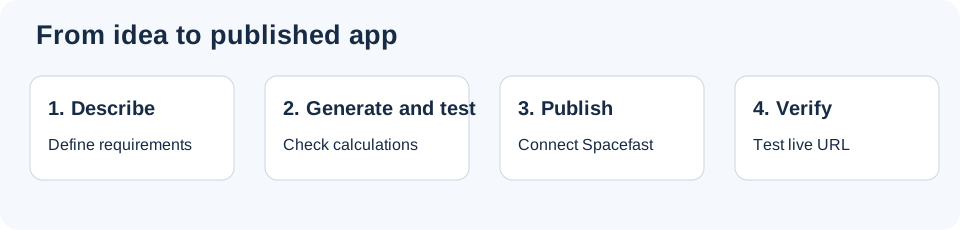
1. Start with a useful, testable application
Our calculator asks for three values: number of people, meeting duration in minutes and estimated hourly cost per person. It immediately shows the total.
Formula: participants × (minutes ÷ 60) × hourly cost.
For six people meeting for 45 minutes at €40 per hour, the result is €180.
Expected application screen — illustrative mockup
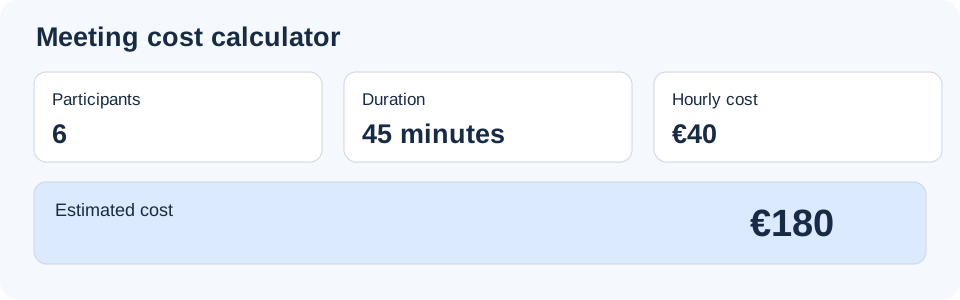
Illustration of the expected result, not a screenshot of an app deployed on Spacefast.
Give the AI a precise prompt
Use this prompt with your preferred coding assistant:
Create a responsive meeting-cost calculator using plain HTML,
CSS and JavaScript. No external dependencies or backend.

Inputs:
- Participants: integer, minimum 1, default 6
- Duration in minutes: positive number, default 45
- Hourly cost in EUR: non-negative number, default 40

Formula:
total = participants * durationMinutes / 60 * hourlyCost

Requirements:
- Update the result when any input changes.
- Use accessible labels and aria-live for the result.
- Validate inputs and never display NaN or Infinity.
- Work on a 360px-wide screen.
- Do not add tracking, external APIs or accounts.
- Return complete index.html, styles.css and app.js files.
- Explain how to test them locally.
Save the three files in the same directory. Check that index.html references the correct stylesheet and script. Open the page in a browser. If the assistant introduced dependencies or build steps, ask it to explain them before continuing.
2. Test the calculator before deploying
A generated application is not automatically a correct application. Test known inputs first.
| People | Duration | Hourly cost | Expected total |
|---|---|---|---|
| 6 | 45 min | €40 | €180 |
| 3 | 120 min | €50 | €300 |
| 1 | 30 min | €0 | €0 |
Then empty a field, enter a negative number, resize the browser to mobile width and navigate with the keyboard. The calculator should reject invalid values gracefully.
If a test fails, send the exact inputs and observed output to the assistant. Ask for a targeted fix and rerun the tests. Keep a working local version before trying to publish.
3. Connect your AI assistant to Spacefast
The service is presented as an AI-oriented way to host projects. Start with the official Spacefast website and its current documentation, rather than relying on instructions copied from an old tutorial.
- Create a Spacefast account and inspect the plan available to you.
- Consult the current setup instructions for your specific assistant (ChatGPT, Claude, Cursor or another supported client).
- Use the officially documented connection method. Review permissions before authorizing access.
- Confirm that the connection supports the type of project you created: static HTML/CSS/JavaScript.
- Keep credentials and private tokens out of public chats, source code and screenshots.
Important: This guide cannot yet give verified button labels or a universal connection command. Those depend on the supported client and the current Spacefast integration. We will not invent them.
4. Publish the tested application
Once your assistant is connected through the supported workflow, give it the tested files and a narrowly scoped instruction:
Publish my tested meeting-cost calculator to my Spacefast
workspace using the officially supported publishing workflow.

Keep the HTML, CSS and JavaScript logic unchanged.
Do not add analytics, authentication, external APIs or a database.
If a private preview is supported, use it first.
Report the published URL, the files deployed and any errors.
Do not configure a custom domain without my confirmation.
This is a proposed instruction, not a verified Spacefast command. If the assistant cannot publish the project, follow the actual integration documentation and record the error rather than guessing.
After deployment, open the URL in a separate browser. Check the two expected calculations, responsive layout, missing files (404s), console errors and unexpected network requests. Test whether an incognito visitor can open the link: a difficult-to-guess URL is not necessarily access control.
Finally, change a harmless label, redeploy and verify that the updated version appears.
5. Improve the app: save calculation history
Our first version works only in the browser. Once you close the page, its previous calculations are not stored in a shared database.
A useful next feature is Save calculation, followed by a list of previous estimates.
What we want to build next — illustrative history
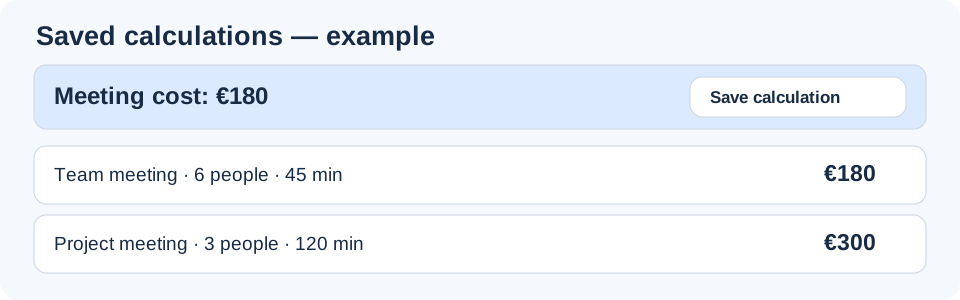
Illustrative result. These records have not been saved on Spacefast.
6. How to use a database without exposing passwords
This is the part that often sounds more complicated than it really is. Let's start with the question: When someone clicks Save, where does the calculation go?
Step 1 — Understand the three components
How saving a calculation works — three steps
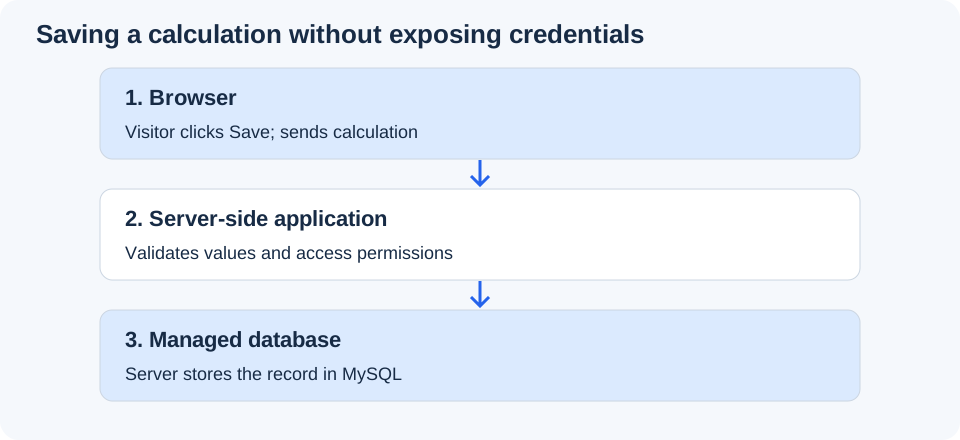
Browser → server-side verification → managed database.
The key rule: the browser never needs the MySQL username or password. It calls server-side code, which is responsible for accessing the database safely.
With traditional PHP/MySQL hosting, you normally keep database credentials in a private server configuration file. Spacefast documents a managed database binding for supported server runtimes. In its Zero runtime, server-side code can use ctx.db; in Functions, the documented binding is env.DB. These are developer-facing names for a connection managed by the platform—not secrets to copy into JavaScript.
The exact APIs and supported runtimes should be checked in the Spacefast database documentation before implementation.
Step 2 — Ask the assistant to add persistence
Do not ask the AI to “put the MySQL password in the JavaScript.” Instead, give it a feature specification:
Extend our tested meeting-cost calculator so a signed-in user
can save calculations and see their own history after reloading.

Use a Spacefast-supported server runtime and its managed database
binding, following the current official documentation.

Requirements:
- Add a Save calculation button and a history list.
- Store participant count, duration, hourly cost and total.
- Validate all inputs and recalculate the total on the server.
- Restrict reading and writing records to their owner.
- Do not put database credentials, tokens or API keys in the browser.
- Explain each created or changed file.
- Explain how to test saving, reloading and access permissions.
- Do not invent unsupported Spacefast APIs.
Why ask for a signed-in user? If the history is personal, the server needs a reliable way to know whose records it is returning. Without authentication and authorization, one visitor could potentially read another visitor's calculations. A managed database does not automatically solve this problem.
Step 3 — Know what the AI is supposed to create
The assistant should produce three functional pieces:
| Piece | Purpose | Where it runs |
|---|---|---|
| Save button and history | Sends requests and displays results | Browser |
| Server-side save/read handlers | Validate inputs, enforce ownership, perform queries | Spacefast server runtime |
| Estimates table | Stores the calculations | Managed database |
A suitable record might contain an internal ID, owner ID, participant count, duration, hourly cost, calculated total and creation date. The server should calculate the total itself rather than trusting a value supplied by the browser.
Step 4 — Test the database in the correct order
- Save a meeting with 6 people, 45 minutes, €40/hour. Expect €180 in the history.
- Reload the page. The saved record should still be visible.
- Save a second meeting: 3 people, 120 minutes, €50/hour. Expect €300.
- Sign in as another test user. That user must not see the first user's private records.
- Try invalid inputs and confirm the server rejects them.
- Redeploy a harmless interface change and verify the saved records remain.
- Inspect the available backup/export procedure before treating the project as production-ready.
This is a test plan, not a claim that we have already executed it on Spacefast. Record the actual results and error messages during the real deployment.
Step 5 — What about API keys for other services?
The database connection is only one kind of secret. If your application later calls an external email, payment or AI service, that provider may give you an API key.
Do not put it in HTML, browser JavaScript, GitHub or a screenshot. Spacefast documents server-side environment variables for secrets; the server accesses the key without returning it to the browser. Check the current environment-variable documentation and review what permissions your AI agent receives.
Step 6 — Know when a database is unnecessary
A calculator that only displays a result needs no database. Add persistence only when you need saved history, accounts, shared records or similar features. Every database adds responsibilities: validation, access control, backups, retention and recovery.
7. What do “20 Spaces” actually mean?
A Space is a hosted project, such as a site, app or prototype. It is not an AI prompt, and the allowance is not 20 new projects per month.
For example, one landing page + one calculator + one prototype = three Spaces. Editing and republishing the calculator does not create a new Space unless you deliberately create another project.
The detailed Spacefast pricing documentation describes these plan allowances:
| Plan | Listed base price | Spaces | Storage per Space |
|---|---|---|---|
| Personal | $0 | 20 | 1 GB |
| Go | $5/month | 100 | 10 GB |
| Pro | $15/month | 500 | 25 GB |
| Enterprise | Custom | Custom | Contract-based |
A separate limit matters: usage-based resources, such as compute or traffic, can have monthly allowances or charges. The number of Spaces does not mean unlimited resource usage. The detailed documentation describes monthly usage credits, which reset rather than accumulate.
Pricing pages and launch materials may not always use the same plan names or allowances. Check the live billing dashboard and current terms before upgrading or relying on a specific limit.
8. Spacefast or conventional hosting?
Spacefast is interesting because it aims to reduce the gap between creating a project with AI and publishing it. Conventional hosting may offer more direct server control, but often requires additional setup.
For a real project, compare supported frameworks, deployment and rollback, access to logs, backup/export, custom domains, security, data portability and total costs—not only the advertised subscription price.
Our small calculator is a useful first experiment precisely because we can check whether it works. The database extension adds a more meaningful second test: can the platform preserve data safely across updates?
Frequently asked questions
Can I use my existing AI assistant?
Spacefast is presented as working with existing AI development tools. Verify the current supported-client list and connection instructions for your chosen assistant.
Does every application need MySQL?
No. Our first calculator is static. The saved-history version requires persistent storage and server-side access controls.
Do I have to enter MySQL credentials in JavaScript?
No. Never put database credentials in browser code. For supported Spacefast runtimes, use the platform-managed server-side database binding.
Are 20 Spaces 20 prompts each month?
No. They represent hosted projects. Monthly resource usage is tracked separately.
Can I use it for a client project?
Review the current commercial terms, privacy requirements, authentication, backup options and actual resource limits before promising a production deployment.
Try Spacefast: The Spacefast service is an option to investigate if you want to publish an AI-built application. Affiliate links on CeiKay may generate a commission at no additional cost to you. This guide is an explanatory workflow, not an independently completed hosting benchmark.