
Joomla 6.2.1 vydán: 58 bezpečnostních oprav, opravy chyb a jak bezpečně aktualizovat

Joomla 6.2.1 přináší 58 bezpečnostních upozornění a údržbových oprav. Zjistěte, co se změnilo, jak aktualizovat z administrace Joomla a kde najít oficiální soubory ke stažení a dokumentaci.
The Joomla Project has released Joomla 6.2.1, a security and maintenance update that website administrators should prioritize.
Published on November 24, 2026, the release addresses 58 security advisories, including four classified as critical, alongside improvements to accessibility, scheduled tasks, content management and administration.
Joomla 5.4.11 has also been released, allowing websites that have not yet moved to Joomla 6 to receive the latest security fixes.
58 security fixes: why this update matters
The Joomla Security Strike Team has addressed vulnerabilities across multiple severity levels.
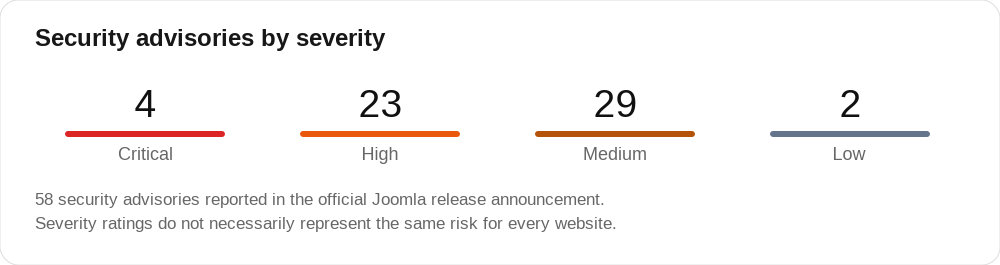
The four critical advisories are identified as 20261111, 20261112, 20261117 and 20261156.
Administrators can consult the individual security advisories for technical details, affected components and conditions of exploitation.
For production websites, the recommended approach is to prepare a backup and install the security update promptly, rather than waiting for the next feature release.
What else has changed in Joomla 6.2.1?
Security is the main reason to update, but Joomla 6.2.1 also delivers useful corrections.
| Area | Notable improvements |
|---|---|
| Accessibility | 27 fixes, including dark-mode readability, keyboard settings and alternative text for the two-factor authentication QR code |
| Scheduled tasks | Improved execution history and prevention of duplicate execution for a running task |
| Content management | RSS images with spaces in filenames and cleaner punctuation around custom fields |
| Multilingual editing | TinyMCE improvements for right-to-left languages |
| Administration | Corrected Super Users permissions overview and administrator menu behavior |
| Web Services API | Rejected deletion requests now return an error instead of reporting success |
The update also includes changes to third-party libraries and translations.
A useful fix for scheduled tasks
One particularly interesting correction concerns Joomla's scheduled tasks.

Previously, certain long-running executions could be missing from the task history. Joomla 6.2.1 improves the recording of executions lasting 100 seconds or longer.
It also prevents a task that is still running from being launched a second time through the command line.
For websites using scheduled content publication, synchronization or maintenance tasks, these corrections improve operational reliability.
How to update Joomla 6.2.1 step by step
For a website already running Joomla 6.x, the update can normally be performed directly from the administration interface.
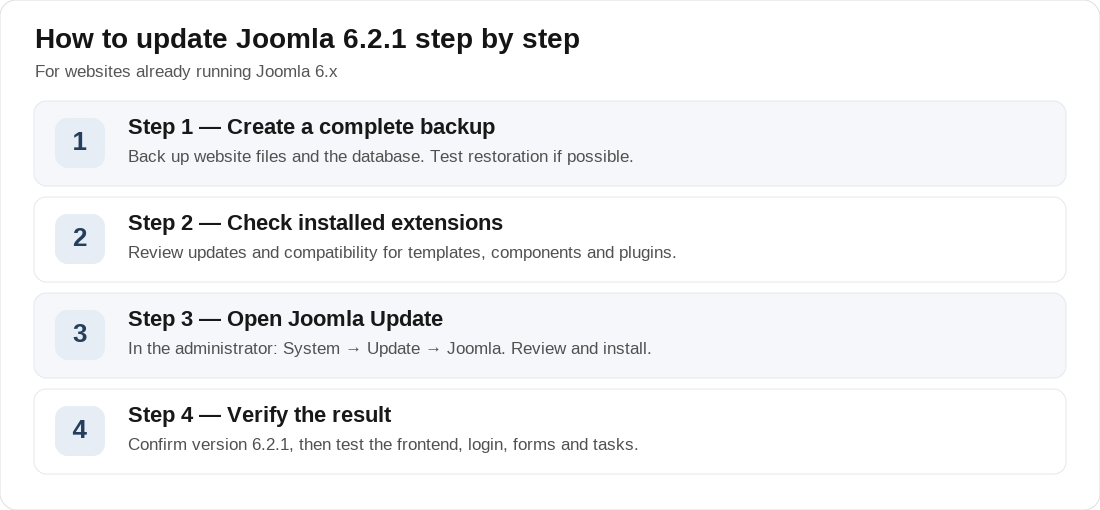
Step 1 — Create a complete backup
Back up both the website files and the database. Make sure the backup can be restored. For an important production website, test the update on a staging copy first.
Step 2 — Check installed extensions
Review available updates for templates, components, modules and plugins. Confirm compatibility with the Joomla version you are installing, especially for extensions that modify core behavior.
Step 3 — Open Joomla Update
Sign in to the Joomla administrator interface and navigate to System → Update → Joomla. Review the proposed version and the pre-update information, then start the update.
Step 4 — Verify the result
Confirm that Joomla reports version 6.2.1. Test the public website, administrator login, article editing, forms, extension functionality and scheduled tasks. Check the site's error logs if anything behaves unexpectedly.
These are the standard steps recommended for an update through Joomla's administrator interface.
Still using Joomla 5.4?
There is an important distinction between applying a security update and upgrading to a new major Joomla version.
| Current installation | Recommended action |
|---|---|
| Joomla 6.2.0 | Update to Joomla 6.2.1 |
| Earlier Joomla 6.x | Update to Joomla 6.2.1 after compatibility checks |
| Joomla 5.4.x | Install Joomla 5.4.11, then plan the upgrade to Joomla 6 separately |
| Older unsupported Joomla versions | Review the official upgrade path and extension compatibility before proceeding |
Joomla 5.4 is scheduled to receive security support until October 12, 2027.
Moving from Joomla 5.4 to Joomla 6 is an upgrade that deserves additional checks, particularly for third-party extensions and the Behaviour – Backward Compatibility 6 plugin.
Official documentation and downloads
These resources are useful for preparing and completing the update:
- Official Joomla 6.2.1 release announcement
- Joomla 6.2.1 installation and upgrade packages
- Joomla release roadmap and support dates
- Joomla documentation portal
- Joomla Security Centre
For manual package-based updates, use the appropriate upgrade package, not the full installation package. The official download page distinguishes the two and provides checksums.
Should you install Joomla 6.2.1 now?
Yes. Joomla 6.2.1 is a security update that should be prioritized.
The number and severity of the corrected vulnerabilities make this release especially relevant to production websites.
For sites already running Joomla 6, the update is a straightforward maintenance operation when the usual backup and compatibility checks have been completed.
For Joomla 5.4 users, version 5.4.11 provides the corresponding security fixes while leaving time to plan the transition to Joomla 6.
The essential sequence remains simple: back up, update, verify.